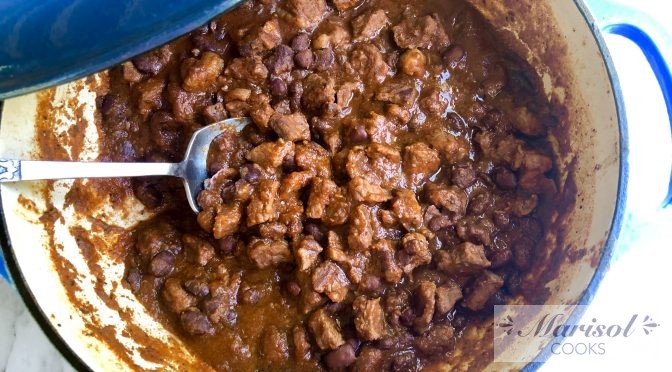
There is so many version of chili con carne, some with beans, some without beans, some are made by soaking and pureeing a variety of dry peppers, some are tomato based, there’s even vegan chili! chili verde, white chili…the list goes on. I can’t remember exactly when was the first time I had chili, I know I was living here in San Antonio because Chili is not a dish we use to eat in Mexico. I do remember though, that I wasn’t crazy about it, all I tasted was the acidity of canned tomatoes and a bunch of spices that make the taste of the meat almost disappear. I like a more meaty chili, I use all the spices but the taste is not so strong that you can’t taste the meat or the beans. I like tomatoes on my chili so I use very ripe Roma tomatoes to make it sweet and I garnish with peppers instead of adding them into the sauce. Chili is an authentic Texmex dish and I hope the “authentic Texmex patrol” don’t try to come get me or I’ll start talking about how cheddar cheese and sour cream don’t play in authentic Mexican cuisine. J/K! Not really. Anyway, this is my version of Chili con carne, it is easy, fast, rich and delicious! Give it a try!
On a small sauce pan, cover the tomatoes with water and boil for about 10min. On medium high heat, heat a heavy bottom skillet. Cutting the meat into 1/2″ pieces. Add 1 teaspoon of oil to the skillet and start browning the meat. It will release some liquid, stir it a few times and let all the liquid to evaporate. Keep stirring until well browned. Once the liquid has evaporated and the meat is brown, add the black beans and stir until combined. Blend the tomatoes with the onion, garlic and spices. Add the sauce to the meat and beans. Cover and let it simmer on low heat until the meat is very tender. For the meat I used, it took about 30-40 minutes. Stew meat might take a couple of hours. Read the meat packaging. This is after 30 minutes. The sauce has thickened and the meat is very tender. If you don’t like a very thick chili you can add some water and if you prefer a thicker chili, add tomato paste or let it simmer uncovered and the sauce will thicken even more.
Delicious! There are so many things you can make with chili. Some of my favorites are chili nachos, chili cheese fries, top it with an egg and eat it for breakfast. So many possibilities! But tonight I am just going to have a bowl of chili con carne and some corn bread. Find the recipe below!
Sour cream, shredded cheddar cheese and jalapeños (optional)
Instructions
In a small sauce pan, cover the tomatoes with water and boil for about 10min.
Cut the meat into small cubes, about 1/2" thick. Heat a heavy bottomed pot on medium high heat and all a teaspoon of oil. Add the meat. It will release some juices, let it evaporate and stir the meat until browned.
In a blender, add the tomatoes, onions, garlic, oregano and spices. Blend until very smooth.
Add the beans to the meat and stir until combined. Add the sauce. Lower the heat and simmer for about 30-40 min until tender. If you're using stew meat read the meat packaging, it will take a couple of hours to get really tender.
Garnish with sour cream shredded cheddar cheese and peppers if desire.
Hello, my name is Marisol Chancellor. I was born and raised in Monterrey Mexico. I’ve been living in Texas for 12 years, and even when I love barbeque, fruit cobblers, and sweet tea, there’s something that has the power of transporting me right back to my mom’s kitchen and gives me a little piece of home; cooking. I grew up in the kitchen and for me, memories are always linked to food, and behind the food, well, there’s always a story that comes along. So, please let me share with you my love for cooking and while we are at it, let’s share some memories, because let’s be honest, we are also hungry for nostalgia.
Dashboard. Flag defines if Two-Factor Authentication was passed.
Session
apbct_antibot
This cookie is used to distinguish between humans and bots. This is beneficial for the website, in order to make valid reports on the use of their website.
session
ct_check_js
Used in order to detect spam and improve the website's security.
session
ct_fkp_timestamp
Used in order to detect spam and improve the website's security. Does not store visitor specific data.
session
ct_has_scrolled
This cookie is used to distinguish between humans and bots.
session
ct_pointer_data
Used in order to detect spam and improve the website's security. Does not store visitor specific data.
session
ct_ps_timestamp
Used in order to detect spam and improve the website's security. Does not store visitor specific data.
session
ct_timezone
Used in order to detect spam and improve the website's security.
Session
apbct_cookies_test
Сookie to validate other cookies, so they can’t be spoofed.
Session
apbct_
Group of cookies which are set from backend and contain information about the current user
Session
ct_
Group of cookies used for storing dynamic variables from browser
Session
ct_sfw_
Group of cookies used for our SpamFireWall technology.
Session
spbc_cookies_test
Cookie to test cookies so we know that everything working properly
Session
spbc_firewall_pass_key
The flag defines if the Security Firewall was passed.
Session
spbc_is_logged_in
Dashboard. Flag defines if a user was logged in.
Session
These cookies are needed for adding comments on this website.
Name
Description
Duration
comment_author
Used to track the user across multiple sessions.
Session
comment_author_email
Used to track the user across multiple sessions.
Session
comment_author_url
Used to track the user across multiple sessions.
Session
Statistics cookies collect information anonymously. This information helps us understand how visitors use our website.
Google Analytics is a powerful tool that tracks and analyzes website traffic for informed marketing decisions.
Contains information related to marketing campaigns of the user. These are shared with Google AdWords / Google Ads when the Google Ads and Google Analytics accounts are linked together.
90 days
__utma
ID used to identify users and sessions
2 years after last activity
__utmt
Used to monitor number of Google Analytics server requests
10 minutes
__utmb
Used to distinguish new sessions and visits. This cookie is set when the GA.js javascript library is loaded and there is no existing __utmb cookie. The cookie is updated every time data is sent to the Google Analytics server.
30 minutes after last activity
__utmc
Used only with old Urchin versions of Google Analytics and not with GA.js. Was used to distinguish between new sessions and visits at the end of a session.
End of session (browser)
__utmz
Contains information about the traffic source or campaign that directed user to the website. The cookie is set when the GA.js javascript is loaded and updated when data is sent to the Google Anaytics server
6 months after last activity
__utmv
Contains custom information set by the web developer via the _setCustomVar method in Google Analytics. This cookie is updated every time new data is sent to the Google Analytics server.
2 years after last activity
__utmx
Used to determine whether a user is included in an A / B or Multivariate test.
18 months
_ga
ID used to identify users
2 years
_gali
Used by Google Analytics to determine which links on a page are being clicked
30 seconds
_ga_
ID used to identify users
2 years
_gid
ID used to identify users for 24 hours after last activity
24 hours
_gat
Used to monitor number of Google Analytics server requests when using Google Tag Manager
1 minute
Marketing cookies are used to follow visitors to websites. The intention is to show ads that are relevant and engaging to the individual user.
Facebook Pixel is a web analytics service that tracks and reports website traffic.